Crossfire at Con of the North 2027
Crossfire is coming back to Con of the North! Stop by, sit down, and explore a classic open-source fantasy world with other players at the table and online. No experience needed - we will get you from "never heard of it" to "fighting your first monsters" in a few minutes.
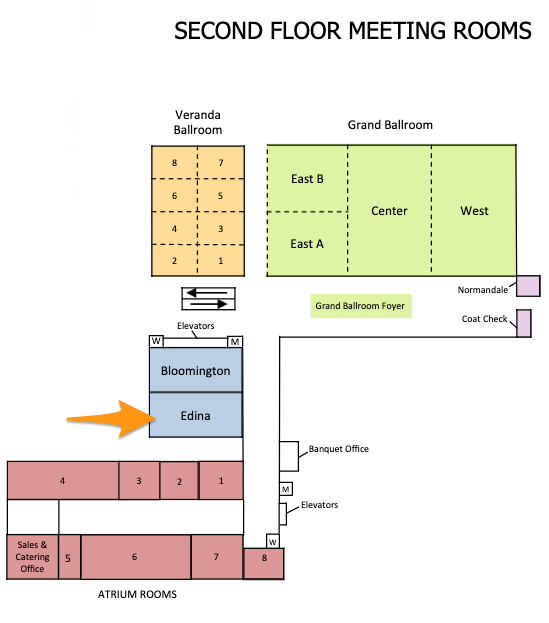
Find us in the Edina room. Linux computers with the Crossfire client already installed are set up and ready - just sit down and play. Nothing to download, nothing to bring.
What is Crossfire?
Crossfire is a free, open-source, cooperative multiplayer graphical RPG and adventure game. It has been in development since the early 1990s and is still actively maintained by a volunteer community. Players share one persistent world, where they can team up, trade, chat, or strike out on their own.
If you have played Gauntlet, NetHack, Moria, or Angband, Crossfire will feel familiar: a top-down tile view, real-time action, deep character building, and a world full of secrets. Highlights include:
- Around 3000 maps to explore, from towns and wilderness to deep dungeons
- More than 150 kinds of monsters
- 13 playable races and 15 character classes
- A skill system and an elaborate magic system (spells and prayers)
- Many artifacts and treasures scattered across the world
- Quests, shops, guilds, housing, and a lot of hidden lore
Crossfire uses a client/server design. The server runs the world; you connect to it with a client program available for Windows, macOS, and Linux.
Con of the North 2027
| Dates | Friday, February 12 through Sunday, February 14, 2027 |
|---|---|
| Location | DoubleTree by Hilton Hotel Bloomington - Minneapolis South 7800 Normandale Blvd, Bloomington, MN 55439 |
| Crossfire room | Edina room |
| Crossfire sessions | Friday 12:00, Friday 20:00, Saturday 10:00, Saturday 16:00, Sunday 10:00, Sunday 16:00; Also available for Open Gaming Sessions |
| Registration | Badges and event sign-ups are handled through Tabletop.Events. See conofthenorth.org for convention details. |
Quick Start Tutorial
Follow these steps and you will be playing within a few minutes. Helpers will be in the room all weekend, so ask any time you get stuck.
1. Sit down at a game computer
The Linux computers in the Edina room already have the Crossfire client installed. Grab an open seat and start the client.
2. Connect to the con server
The Con of the North server runs on the room's local network. When the client starts, a server list appears. Pick the Con of the North server and click Connect. If you do not see it, ask a helper.
3. Create an account
The first time you connect, choose Create new account and pick an account name and password. One account can hold several characters, so you can try more than one race or class over the weekend.
4. Create a character
Choose New character, then:
- Name your adventurer.
- Pick a race. Each race changes your starting stats and may grant special abilities. Read the description shown for each one.
- Pick a class. For a first game, a fighter-type class is the most forgiving. Spellcasting classes are rewarding but fragile early on.
- Set your stats. Put points into the stats your class depends on (Strength and Constitution for fighters, Intelligence or Wisdom for casters).
Do not worry about getting it perfect. Making a second character is quick and is a great way to learn.
5. Learn the basic controls
These are the default key bindings. They can be changed from the client's key binding settings.
| Action | Keys |
|---|---|
| Move | Arrow keys or numeric keypad (keypad allows diagonals) |
| Attack in melee | Move into a monster |
| Run | Ctrl + direction |
| Fire (bow, thrown weapon, or readied spell) | Shift + direction |
| Type a command | ' (apostrophe), then type the command and press Enter |
Useful commands to type:
help- list help topicswho- see who else is playingsay <text>- talk to players and NPCs nearbychat <text>- talk to everyone on the serverskills- list the skills your character knowscast <spell>- ready a spell, then fire it with Shift + direction
6. Your first hour
- Talk to everyone. Stand next to an NPC and use
say hello. Many NPCs give hints, directions, or quests. Try asking about words they mention. - Check your gear. Open your inventory and make sure your weapon and armor are equipped (applied).
- Start small. Fight weak monsters near town before heading into dungeons. Watch your hit points.
- Pick things up. Loot, coins, and gems can be sold in shops to buy better equipment.
- Pray if you get hurt. Resting and praying at an altar can help you recover. Ask a helper or another player about the temples in town.
- Team up. Crossfire is cooperative. Groups of players at the con can explore together and share the work.
7. If you die
It happens to everyone. Depending on the server settings you will either return to life with a penalty or need to start a new character. Either way, it is part of the fun - and every death teaches you something about the world.
Keep Playing After the Con
Crossfire is free forever. The con server is on a private local network,
so your con character stays at the con - but you can start a new
adventure at home. Download the client from the Crossfire website
or the Crossfire downloads on SourceForge (Linux users can usually install the crossfire-client package from their distribution), then connect to one of the public
servers in the client's server list. To learn more, join the community, or help with
development, maps, and art, visit the Crossfire home page.
See you at Con of the North!